I've been searching for a way to get SQL scripts into OneNote while retaining syntax highlighting from SSMS for a long time now. It's seems unnecessarily hard: OneNote doesn't support RTF-formatted text from the clipboard, which shouldn't be a problem, since it *does* support HTML-formatted text. Unfortunately, its HTML rendering seems to lack support for the <whitespace> tag.
So pasted text doesn't generally work right.
Lots of folks use MS Word as a go-between, which makes the text look right, but Word uses the NBSP (non-breaking space) character for many of the spaces, which SSMS doesn't like at all.
Here's the best option available, I think, for OneNote 2013: http://notehighlight2013.codeplex.com/. I've used it, and it's just like the NoteHighlight 2010 plug in, with the advantage that the installer is in English. I love this, and I'm grateful to smsmith0 for porting this.
It also appears that Outlook handles things differently, so it mostly works using an Outlook email body as an intermediary for your pasted text from SSMS. NoteHighlight is better.

Showing posts with label Microsoft Office OneNote. Show all posts
Showing posts with label Microsoft Office OneNote. Show all posts
Thursday, January 29, 2015


Friday, May 25, 2012
Pasting Code to OneNote 2010 with Formatting and Colors
[Update 1/2915]
Head over here for a solution for OneNote 2013. Annoying, but it works!
I use OneNote as a SQL script repository, and in most respects it’s a great solution: it’s searchable, the notebooks make organizing easy, and its integration with SharePoint (and SkyDrive) is pretty good. There’s one problem, though, that has made it less than ideal: color formatting doesn’t come through from SSMS. Notepad++ is my go-to editor for long scripts (if you’ve not used it, you should check it out), and it has what ought to be a perfect combination of plug-ins for the job:
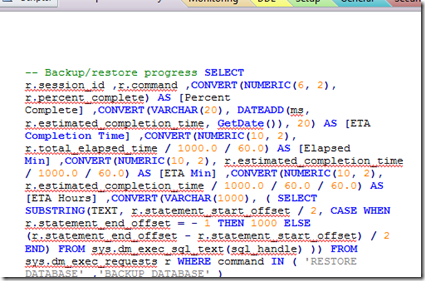
Here’s what my code looked like when pasting formatted SQL from NppExport:
Head over here for a solution for OneNote 2013. Annoying, but it works!
I use OneNote as a SQL script repository, and in most respects it’s a great solution: it’s searchable, the notebooks make organizing easy, and its integration with SharePoint (and SkyDrive) is pretty good. There’s one problem, though, that has made it less than ideal: color formatting doesn’t come through from SSMS. Notepad++ is my go-to editor for long scripts (if you’ve not used it, you should check it out), and it has what ought to be a perfect combination of plug-ins for the job:
- First is the excellent Poor Mans’ T-Sql Formatter. This is a first-rate SQL formatter that integrates with SSMS and Notepad++.
- Second is NppExport (included with NPP), which allows you to copy the selected text to the clipboard as HTML. Unfortunately, OneNote doesn’t really handle HTML (even!) very gracefully: NppExport html is rendered by OneNote without any line breaks. It should be noted that this appears to be a limitation in the rendering that OneNot does, not in the HTML generated by NppExport.
Here’s what my code looked like when pasting formatted SQL from NppExport:

I'm guessing, by the way, that this is a result of NPPExport using the White-space:pre tag in the exported HTML (css, really). It would appear that ON doesn't do full HTML. See this connect item for an upvote on fixing that.
Update: Microsoft has removed Connect options for OneNote, so there's no longer a good way to submit or track bugs.
Here is the same SQL when pasted from NoteHighlight: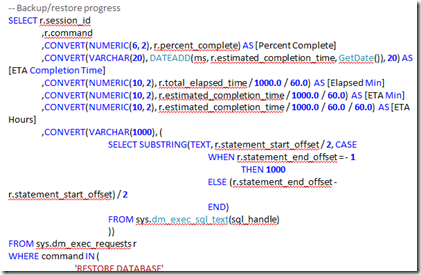
Better, huh? Note that the colors aren’t the same: NoteHighlight actually does some parsing of the code and does its own coloring. You can choose from a variety of syntax color schemes.
Update 8/26/12: Bad news for folks using ON 2007: this only appears to work with OneNote 2010. Thanks to +Edelman for pointing that out. The NoteHighlight page on Codeplex appears to be pretty static, too, so I wouldn't hold out a lot of hope for feature requests and the like.
Update: Microsoft has removed Connect options for OneNote, so there's no longer a good way to submit or track bugs.
Here is the same SQL when pasted from NoteHighlight:

Better, huh? Note that the colors aren’t the same: NoteHighlight actually does some parsing of the code and does its own coloring. You can choose from a variety of syntax color schemes.
Update 8/26/12: Bad news for folks using ON 2007: this only appears to work with OneNote 2010. Thanks to +Edelman for pointing that out. The NoteHighlight page on Codeplex appears to be pretty static, too, so I wouldn't hold out a lot of hope for feature requests and the like.
Subscribe to:
Posts (Atom)