You'll have to reboot the admin console, as well as your standard weblogic web services, for this change to take effect.

Thursday, July 10, 2008
WebLogic Case Sensitivity
Prior to v9.0, Weblogic was case-insensitive in Windows, but starting with v9, the default is, like Apache, to be case sensitive. A web search on changing that behavior isn't very helpful, and the setting is buried a bit, so I thought I'd post the instructions on changing that setting.
The first step is to run the weblogic admin console. The default URL, once that has been started, is to browse to http://servername:9999/console.
You'll be prompted for the username/password that you configured when installing weblogic.
Once there, click on Domain-> Security-> Advanced.
There you will see a "Web App Files Case Insensitive:" setting. By default, this is set to "false". Change it to "os", click on save.
Once it's been saved, the changes have to be Activated. Click on the green Activate Changes button on the left-hand side of the screen.


Tuesday, June 17, 2008
Persistent Problem with MS Update
Have you ever gotten a Windows system that simply won't update? That is, it'll find all the updates it needs from Microsoft, but the updates won't do anything but fail. It's a bummer, because the normal reboot simply won't fix the problem.
It turns out there is a solution. The problem appears to come from XP SP3, beauty, that. In any case, this should fix the problem:
Run:
REGSVR32 WUAPI.DLL
REGSVR32 WUAUENG1.DLL
REGSVR32 ATL.DLL
REGSVR32 WUPS2.DLL
REGSVR32 WUCLTUI.DLL
REGSVR32 WUPS.DLL
REGSVR32 WUWEB.DLL
REGSVR32 WUAUENG.DLL
Windows Vista Look and Feel in XP
If you're interested in making your XP system look like Vista, there are a ton of resources out there. Why another one? Because I want to keep it simple. I found two resources that gave me the whiz-bang look and functionality without fiddling too much with lots of other apps.
In short, I used what must be the gold standard, Vista Transformation Pack, along with TrueTransparency and the Microsoft Zune XP theme. With these three packages, I got more than I needed, and they're all free.
I ended up unselecting the toolbar and start button transformations from the vista transformation pack; I don't care for the tool bar, and the Start Button just wasn't quite where I think it should be: you can't right-click on the icons, and there's just a bit missing.
Still, it makes for a great user experience, without a lot of the Vista negatives.
Wednesday, June 11, 2008
Desktop Search for Windows x64
Windows released version 4 of its desktop search recently, and I must say that it (mostly) works well. With the Vista desktop, one simply can begin typing a search string at the start menu, and Windows will present the search results there as you type.
The problem: UNC indexing isn't apparently supported in the 64 bit environments, at least not with Server 2008, and the network shares I want to index are stored on Windows Server 2000 boxes: those won't run the new indexing tool.
So what to do?
The problem: UNC indexing isn't apparently supported in the 64 bit environments, at least not with Server 2008, and the network shares I want to index are stored on Windows Server 2000 boxes: those won't run the new indexing tool.
So what to do?
Tuesday, April 22, 2008
PeopleSoft Upgrade Woes
When upgrading a PeopleSoft database from 8.47 to 8.49, we ran into a curious problem, receiving this error:
SQL Error. Error Position: 14 Return: 6550 - ORA-06550: line 1, column 15: PLS-00103: Encountered the symbol "TABLE" when expecting one of the following: := . ( @ % ;
It turns out that it was a simple problem, but it wasn't at all obvious from the error: the DDLORA.DMS script that ran during the initial part of the upgrade was old; for whatever reason, it hadn't gotten updated by the install process.
This is what was happening:
Datamover was importing the tables, and the first succeeded. Then: it went to compute statistics. That's where things went wrong. Here's why: the ddlora.dms script defines not only default tablespace parameters, but also the method by which DataMover will compute statistics. Pre-8.48 PeopleSoft did it using the 'analyze table' method, while 8.49 uses the dbms stats method. With the old statistics parameters in the PSDDLMODEL table, the compute stats call failed, and so did the upgrade.
To fix this problem, we installed PeopleTools 8.49 again on an empty PS Home, and then we copied the new script over.
Tuesday, April 15, 2008
404 (Not Found) Error When clicking on MySite "My Profile" tab in SharePoint
This error is vexing, though there's a simple solution documented in MS kb924399.
I've summarized the solution below with some assumptions about settings that folks normally use.
In short, the problem is that there isn't a site collection set up using the appropriate template in the MySite web application. We'll correct that in a few steps.
Note: it's entirely possible--even likely--that you've already got a site collection created at the root of the mysite web application. If this is a single personal site, that's part of your problem. This site will need to be backed up and deleted before you can go further, assuming that all of your other personal sites are using a different path.
First, we need to create the managed path that SharePoint will use for this site collection.
Next, we'll want to create the site collection using the correct template.This can be anything, but most people will have created their sites with the default root ( / ) site collection. So we'll go with that for our purposes.
To do this, click on Application Mangement -> Define Managed Paths. Make sure, once the defined managed paths screen comes up, that you've got the correct MySite web application selected in the top-right. Go ahead and create the managed path at the desired location.
After doing these steps, the My Profile tab should work again.Click on Application Management -> Create Site Collection to bring up the site collection screen. Make sure you've got the correct web application selected on the left, and then select the managed path you created in the step above for the URL.
Give the site collection a title, like 'Personal Sites', and -- here's the money part -- select the "My Site Host" template from the Enterprise template tab.
Fill in the site administrators fields appropriately and click on OK.
Thursday, April 10, 2008
Simplifying SharePoint Structure with Site Collections
Site Collections in SharePoint 2007 are the "pieces" of a web application. Personal sites (my site), for instance, are each a site collection. There are a couple of real benefits, too, for using many site collections--instead of multiple web applications--to form the bulk of your SharePoint implementation.
SharePoint Maintenance
On the whole, it's simpler to have few IIS web sites (and few web applications) and many site collections. This provides for fewer urls (and thus fewer IIS sites) and fewer ACLs (permissions) to maintain. The permissions piece, in particular, can become a real bear in a large SharePoint installation, as each piece of a web application and all of the pieces of all of its site collections can all have different permissions assigned to them. Using site collections as the primary content-delivery piece can simplify the permissions considerably.
Backups/Restore
Backups in SharePoint are a tricky business, partly because Microsoft gives you many ways to perform backups and recovery. The simplest solution for backing up your SharePoint installation is to do a farm-level backup, which gives you the option of restoring individual web applications.
The downside to using lots of web applications, as most SharePoint administrators quickly discover, is that you end up with a multitude of IIS web sites. To create subdirectories within these sites, administrators create site collections within them, giving a pretty complex structure. Moreover, when you perform a web application backup, you have to restore the web application, which includes all of the site collections contained within it. That complicates the restore process quite a bit.
Some implementations (particularly very large SharePoint sites) will benefit from the above scenario, but most people can get all the functionality and simpler administration by using site collections as the primary structural unit.
Because you can backup and restore individual site collections, it allows you a lot more flexibility and granularity in your backup and restore strategy.
Moreover, it happens from time to time that a web application configuration become corrupt, such that, for instance, the my sites functionality no longer works. If you have backed up the individual site collections from that web application, it is a trivial task to create a new web application and import the component site collections into it.
Backing up site collections, however, does bring up a problem: because stsadm (the admin tool used to backup site collections) requires a site collection url as a command line parameter, there's not an out-of-the-box way to backup all site collections in one fell swoop.
Happily, this problem has been recognized by many competent scripting folks. The script we use is a modified version of the one posted by Mauro Cardarelli on his blog. It runs through all of the site collections in a given url and backs them all up individually.
Note that, should you use this script, it was written for SharePoint 2003, and as a result, the path to the stsadm executable needs to be updated from C:\Program Files\Common Files\Microsoft Shared\web server extensions\60\BIN\stsadm to C:\Program Files\Common Files\Microsoft Shared\web server extensions\12\BIN\stsadm.
Friday, March 28, 2008
401 Error when trying to create MySite (personal site) in SharePoint 2007
It's a common enough problem that you can find untold numbers of questions posted to forums and blogs: why am I getting a 401 denied error when trying to get to/create a mysite personal site in SharePoint?
The problem usually is manifest by first being presented with a username/password prompt three times, followed by a 401 error. Interestingly, in Firefox, it appears that sometimes you just get unending username/password prompts.
Why this is happening: who knows? It's often possible to track down the problem, usually related to application pool permissions or some rogue setting in SharePoint. Even if you do find the problem, though, enough settings in SharePoint are reasonably inaccessible after the initial setup that finding your way to correcting it can take a very, very long, frustrating time.
Our solution has been simply to create a new default shared services provider (SSP) and associate all of the web applications, including the existing mysites, to the new SSP.
The Shared Services Provider in SharePoint is the glue that holds everything together. It manages, in particular, what happens when you click on the "mysite" link. So when that link no longer functions properly, one way to fix it is to set up a new SSP using a new content database and new IIS web site. In this way, we can eliminate a lot of errors without having to do a lot of painful troubleshooting. We'll go through those steps now.
Note that these steps are for SharePoint 2007; they may work on 2003 as well, but I've no experience with it, so I make no promises as to its applicability.
Create the New Shared Services Provider
Open SharePoint Central Administration and click on the Shared Services Administration link on the left-hand side of the screen.
You should see something like the screen shot below. To create a new Shared Services Provider, click on the New SSP link. You'll want to create a new web application to host this, on a new port. Also, specify a new SSP Database, ensuring that any erroneous settings don't get migrated.
Make sure that you use your existing MySite web application (in this example, named "Sharepoint - Personal") for the My Site Location in setting up this new SSP.
Once you've created your new SSP, you can set it as the default (using the Change Default SSP link). Once you've done that, use the Change Associations link to associate all of your existing web applications to the new SSP.
Having done that, you're probably good to go. You might, just to be safe, double-check your My Site settings in the new Shared Services site.
Check your My Site Settings
On the left-hand menu, under Shared Services Administration, click on the title of your new SSP. This will open the SSP home page, like below.
To create a new Shared Services Provider, click on the New SSP link. You'll want to create a new web application to host this, on a new port. Also, specify a new SSP Database, ensuring that any erroneous settings don't get migrated.
Make sure that you use your existing MySite web application (in this example, named "Sharepoint - Personal") for the My Site Location in setting up this new SSP.
Once you've created your new SSP, you can set it as the default (using the Change Default SSP link). Once you've done that, use the Change Associations link to associate all of your existing web applications to the new SSP.
Having done that, you're probably good to go. You might, just to be safe, double-check your My Site settings in the new Shared Services site.
Check your My Site Settings
On the left-hand menu, under Shared Services Administration, click on the title of your new SSP. This will open the SSP home page, like below.
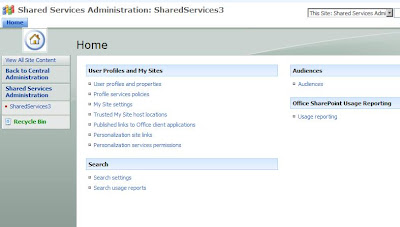 Click on the My Site Settings link and make sure that the Personal Site Location field matches what you had set up previously. Having done that, you're done!
Delete any erroneously-created My Sites
Unless you're not: if you discover later that the personal site location field is incorrect, you may end up with users creating new sites when they already had one. This is disconcerting, but it's easily fixed.
To delete a user's My Site, simply click on the Delete Site Collection link in the Application Tab of the Central Administration page. There you can select the offending site collection from the My Site web application. This will delete the My Site without problem. However, you still need to change the My Site settings in the SSP, as above.
And: having done so, issue a iisreset /noforce on the front-end web servers. Unless you do this, the user runs the risk of being directed, even still, to the now-nonexistent My Site. This gives them a 404 (not found) error. After the iisreset, they should be directed, again, to their original my site.
Click on the My Site Settings link and make sure that the Personal Site Location field matches what you had set up previously. Having done that, you're done!
Delete any erroneously-created My Sites
Unless you're not: if you discover later that the personal site location field is incorrect, you may end up with users creating new sites when they already had one. This is disconcerting, but it's easily fixed.
To delete a user's My Site, simply click on the Delete Site Collection link in the Application Tab of the Central Administration page. There you can select the offending site collection from the My Site web application. This will delete the My Site without problem. However, you still need to change the My Site settings in the SSP, as above.
And: having done so, issue a iisreset /noforce on the front-end web servers. Unless you do this, the user runs the risk of being directed, even still, to the now-nonexistent My Site. This gives them a 404 (not found) error. After the iisreset, they should be directed, again, to their original my site.
 To create a new Shared Services Provider, click on the New SSP link. You'll want to create a new web application to host this, on a new port. Also, specify a new SSP Database, ensuring that any erroneous settings don't get migrated.
Make sure that you use your existing MySite web application (in this example, named "Sharepoint - Personal") for the My Site Location in setting up this new SSP.
Once you've created your new SSP, you can set it as the default (using the Change Default SSP link). Once you've done that, use the Change Associations link to associate all of your existing web applications to the new SSP.
Having done that, you're probably good to go. You might, just to be safe, double-check your My Site settings in the new Shared Services site.
Check your My Site Settings
On the left-hand menu, under Shared Services Administration, click on the title of your new SSP. This will open the SSP home page, like below.
To create a new Shared Services Provider, click on the New SSP link. You'll want to create a new web application to host this, on a new port. Also, specify a new SSP Database, ensuring that any erroneous settings don't get migrated.
Make sure that you use your existing MySite web application (in this example, named "Sharepoint - Personal") for the My Site Location in setting up this new SSP.
Once you've created your new SSP, you can set it as the default (using the Change Default SSP link). Once you've done that, use the Change Associations link to associate all of your existing web applications to the new SSP.
Having done that, you're probably good to go. You might, just to be safe, double-check your My Site settings in the new Shared Services site.
Check your My Site Settings
On the left-hand menu, under Shared Services Administration, click on the title of your new SSP. This will open the SSP home page, like below.
 Click on the My Site Settings link and make sure that the Personal Site Location field matches what you had set up previously. Having done that, you're done!
Delete any erroneously-created My Sites
Unless you're not: if you discover later that the personal site location field is incorrect, you may end up with users creating new sites when they already had one. This is disconcerting, but it's easily fixed.
To delete a user's My Site, simply click on the Delete Site Collection link in the Application Tab of the Central Administration page. There you can select the offending site collection from the My Site web application. This will delete the My Site without problem. However, you still need to change the My Site settings in the SSP, as above.
And: having done so, issue a iisreset /noforce on the front-end web servers. Unless you do this, the user runs the risk of being directed, even still, to the now-nonexistent My Site. This gives them a 404 (not found) error. After the iisreset, they should be directed, again, to their original my site.
Click on the My Site Settings link and make sure that the Personal Site Location field matches what you had set up previously. Having done that, you're done!
Delete any erroneously-created My Sites
Unless you're not: if you discover later that the personal site location field is incorrect, you may end up with users creating new sites when they already had one. This is disconcerting, but it's easily fixed.
To delete a user's My Site, simply click on the Delete Site Collection link in the Application Tab of the Central Administration page. There you can select the offending site collection from the My Site web application. This will delete the My Site without problem. However, you still need to change the My Site settings in the SSP, as above.
And: having done so, issue a iisreset /noforce on the front-end web servers. Unless you do this, the user runs the risk of being directed, even still, to the now-nonexistent My Site. This gives them a 404 (not found) error. After the iisreset, they should be directed, again, to their original my site.
Wednesday, March 26, 2008
Value cannot be null error When Trying to View a SharePoint Site
We ran into a problem after restoring a SharePoint 2007 farm that stumped us for awhile. Namely, the MySites web application wouldn't come up; it had restored successfully, but we'd get a generic error message when we'd try to browse to it. Once we had turned on detailed error reporting, we saw the following error code:
Value cannot be null.
Parameter name: serverContext
at Microsoft.Office.Server.UserProfiles.UserProfileManager..ctor(ServerContext serverContext, Boolean IgnoreUserPrivacy, Boolean backwardCompatible)
at Microsoft.Office.Server.UserProfiles.UserProfileManager..ctor(ServerContext serverContext, Boolean IgnoreUserPrivacy)
at Microsoft.Office.Server.UserProfiles.ProfileLoader.EnsureUserProfile()
at Microsoft.Office.Server.UserProfiles.ProfileLoader.GetUserProfile()
at Microsoft.SharePoint.Portal.WebControls.CreatePersonalSpace.Page_Load(Object sender, EventArgs args)
at System.Web.Util.CalliHelper.EventArgFunctionCaller(IntPtr fp, Object o, Object t, EventArgs e)
at System.Web.Util.CalliEventHandlerDelegateProxy.Callback(Object sender, EventArgs e)
at System.Web.UI.Control.OnLoad(EventArgs e)
at Microsoft.SharePoint.Portal.PageBase.OnLoad(EventArgs e)
at System.Web.UI.Control.LoadRecursive()
at System.Web.UI.Page.ProcessRequestMain(Boolean includeStagesBeforeAsyncPoint,Boolean includeStagesAfterAsyncPoint)
Now this made no sense whatsoever; what's null? The application looked like it was set up correctly, and it had been working before we did the backup and restore (it was a test run of our DR process).
Unfortunately, too, all I could find on the web that referenced the error was information about coding tasks, which isn't what I'm doing at all.
Finally, we fixed it: Alternate Access Mappings. We were using SSL to access the site (through a netscaler load balancer), but post-restore, SharePoint only had http:// in its configuration. After re-adding https:// as a public URL for the web application, the error goes away.
Configuring SharePoint 2007 to Display Errors
By default (and this is a good thing), SharePoint displays a simple generic "an error has occurred" message when a problem arises. In troubleshooting these problems, it's useful to turn on more descriptive error messages.
The first thing to realize in any discussion of detailed error messages on the web is that it's generally not a good thing to keep your site configured to display details of the errors that are generated; it can reveal much about your infrastructure and security that is best kept secret.
So: when you make these changes, be sure to unmake them later.
Locating Web.config
Configuring SharePoint to display a details (including a stack trace) of its errors involves two simple changes to the web.config file that is stored in the root of the affected web site. Hopefully, in setting SharePoint up, you opted to use meaningful names for the web sites. If, however, that didn't happen, call up the Web Application List in SharePoint's application management tab. You'll see a list of the sites (name) and their respective URLs. Those names correspond to the site names in IIS.
Of course, SharePoint doesn't care where that document root is, so if you don't already know where the document root is, open up IIS manager and view the web site's properties. Click on the Home Directory tab, and you'll see the path to use. web.config will be in that directory.
Modifying Web.config
Having located web.config, open it in a text editor, and find the following line:
<customerrors mode="on" />
Change the above setting to Off.
This tells the web app server to display errors as they occur, instead of the generic SharePoint-defined custom error of "An Error occurred."
Likewise, find
<SafeMode MaxControls="200" Callstack="false"
Change the false above to true.
This tells the web app server to display the error stack when an error occurs.
When you save your changes, you should be set, and your SharePoint errors now will display as they occur.
Subscribe to:
Posts (Atom)